Register at EU Casino Official and Activate Your Welcome Package Instantly

Opening an EU Casino account takes under three minutes. You fill in personal details across two short screens, confirm your email, and land straight at the cashier to activate the welcome offer. The platform runs under UKGC and MGA licences, so every step of the sign-up process follows verified KYC standards. This guide walks you through each stage - from finding the registration button to completing your first deposit and claiming free spins on Big Bass Bonanza.
100% up to £100 + 50 spins
Join Nowwith bonus
Why You Need an Account Before Playing

EU Casino requires registration before any real-money gameplay or bonus activation. A verified account gives you access to 5,734 slots from 79 providers, live dealer tables powered by Evolution and NetEnt, daily reload promotions through Daily Picks, and the Prize Twister reward tool - all of which are unavailable without logging in.

For UK players specifically, the welcome offer delivers up to 25 free spins on Big Bass Bonanza (valued at £0.10 each) after a minimum £10 deposit. EUR players receive up to 100 spins at €1 per spin on Jungle Books or The Reel Deal after depositing €10. Neither offer requires a bonus code - both activate automatically once your account is registered and funded.

Already have an account on another SkillOnNet-platform casino such as PlayOJO, SlotsMagic or AHTI Games? The platform supports accelerated sign-up, which skips re-entering data you already submitted to a sister brand.

Open Your Account

Where to Find the Registration Button

On desktop, the green 'Join Now' or 'Register' button sits in the top-right corner of every page. Clicking it opens a multi-step overlay - no separate page load required.

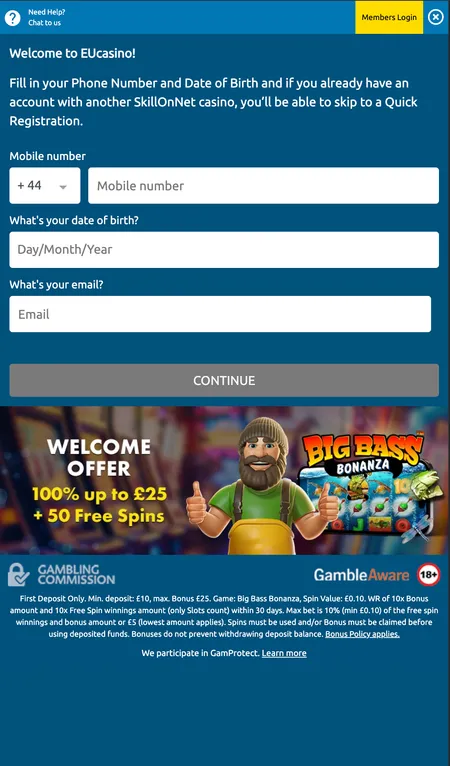
On mobile browsers (iOS Safari, Chrome for Android), the button appears in the sticky header bar alongside the login link. The mobile sign-up flow condenses the first screen to phone number with country code, date of birth, and email address, before proceeding to address and account credentials.

There is no dedicated EU Casino app in the App Store or Google Play - access is entirely through the mobile browser. The registration form is fully responsive and functions identically on Android and iOS devices.

Eligibility Requirements

Before creating an account, confirm you meet these baseline conditions:

  • Minimum age: 18 years (mandatory; EU Casino enforces strict age verification)
  • You must be located in a supported country (UK, Germany, Sweden, Denmark and other European markets)
  • UK residents cannot use credit cards for deposits - debit cards, e-wallets and Trustly are accepted
  • One account per person; duplicate accounts violate the terms of service

The platform accepts accounts in EUR, GBP, USD, CAD, AUD, ZAR, SEK, DKK, NOK and RUB. You select your currency during registration and cannot change it later, so choose carefully.

Registration Methods Available

EU Casino supports three sign-up routes:

Method Details
Email registration Standard form with personal data and password
Phone number Enter mobile number with country code as primary identifier
SkillOnNet fast-track For existing accounts on sister brands (no full data re-entry)

Social login (Google, Facebook) is not offered. Email registration is the most common route for UK and European players and gives you full access to the account settings dashboard.

Sign Up at EU Casino

What the Sign-Up Form Asks For

The registration form is divided into three logical sections:

Screen 1 - Personal identity First name, last name, date of birth, gender, email address, phone number.

Screen 2 - Address details Street address, city, postcode, country of residence.

Screen 3 - Account credentials and optional settings Username, password, optional deposit limit (recommended to set during registration), agreement to terms and privacy policy.

A promotional code field appears in the cashier section after registration - not during the sign-up form itself. The UK welcome offer and EUR welcome offer activate automatically without a code.

Password requirements follow standard security practice: a mix of letters and numbers, minimum 8 characters. Use a unique password not shared with other services.

Step-by-Step: Creating Your EU Casino Account

  1. EU Casino first registration step form

    Step 1 - Personal details. Enter your name, date of birth, gender, email and phone number. On mobile, the phone number and country code appear first. Ensure your date of birth is accurate - it is used for age verification.

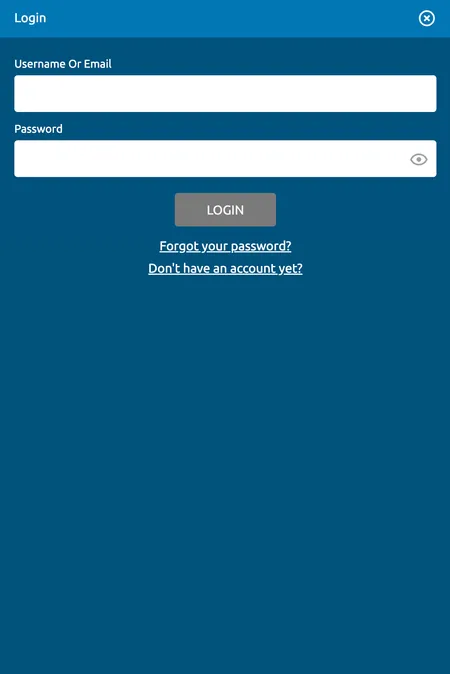
  2. EU Casino login screen after successful registration

    Step 2 - Confirm and log in. After submitting the form and verifying your email, you are returned to the login screen. Enter your username and password to access your new account dashboard.

Email Confirmation

Once you submit the registration form, EU Casino sends a confirmation link to the email address you provided. Click the link to activate your account. Without this step, your account remains inactive and you cannot deposit or withdraw.

Common issues:

  • Email lands in spam or promotions folder - check there first
  • Link expires after a set period - request a new one from the login screen
  • Wrong email entered - contact support via live chat to correct it

After confirmation, you receive a secondary welcome email outlining the active bonus offers. This email also contains the support contact: [email protected].

EU Casino support operates 24/7 via live chat, email and phone. If your confirmation email does not arrive within 10 minutes, the live chat team can resend it immediately.

Registering on Different Devices

The registration experience is consistent across platforms:

Device Access method Notable difference
Desktop (PC/Mac) eucasino.com in any browser Full form visible, no condensed layout
Tablet Mobile browser Optimised layout, same fields
Android Chrome or Firefox browser Phone number shown on first screen
iOS (iPhone/iPad) Safari or Chrome browser Identical to Android flow

No APK download is available for Android, and there is no EU Casino app in the App Store. All registration and gameplay happens through the browser.

Register via Mobile Browser

Your First Login After Registration

After email confirmation, you land on the login screen. Enter the username and password you created during sign-up. The platform supports session persistence on trusted devices, so repeated manual logins can be reduced if your browser saves credentials.

Once inside your account:

  • Your balance appears in the top-right corner
  • The welcome bonus notification appears on the dashboard
  • You can access the Cashier to deposit and trigger the free spins offer
  • Deposit limits you set during registration are already active

If you forget your password at any point, use the 'Forgot Password' link on the login page. The system asks your security question and then sends reset instructions to your registered email. Passwords are not stored in plain text.

Registering Through the EU Casino App

EU Casino does not publish a native app, but the mobile browser version delivers the same registration flow, game library and bonus functionality as the desktop site. The interface adapts to screen size automatically.

For stable registration on mobile:

  • Use a stable Wi-Fi or 4G connection to avoid form timeouts
  • Ensure your browser does not block cookies or JavaScript
  • If the form freezes, reload and your progress may be partially saved

Players interested in the wider mobile experience can read more on the EU Casino application page.

KYC Verification After Sign-Up

Registration creates your account, but full verification (KYC) is required before your first withdrawal. EU Casino requests these documents:

  • Government-issued photo ID (passport or driving licence)
  • Proof of address (utility bill or bank statement, dated within 6 months)
  • Copy of payment method used for deposit (front of card with middle 8 digits masked; for e-wallets, a screenshot showing account number and email)

Upload documents via My Account - Personal Settings - Document Upload. Processing typically completes in under 12 hours; complex cases may take up to 48 hours. If you exceed 48 hours without an update, contact support to check status.

The platform may also trigger an affordability review for high-value accounts. In this case, proof of income or source of funds is requested through the same upload section before further play or withdrawal is possible.

UK residents cannot use credit cards to fund their EU Casino account, in line with UKGC regulations under the Gambling Act 2005. Use a debit card, PayPal, Skrill, Neteller or Trustly instead.

Password Security and Account Protection

EU Casino does not store your password in recoverable form. To protect your account:

  • Choose a password of at least 8 characters using letters and numbers
  • Do not reuse a password from another site or service
  • Enable login notifications if offered in account settings
  • Contact support immediately if you suspect unauthorised access

The platform uses SSL encryption up to 128-bit across all data transfers between your browser and the casino server. All payment methods comply with PCI standards. Three regulatory bodies - UKGC, MGA, and the Danish and Swedish authorities - oversee security standards the operator must maintain.

Create a Secure Account

Common Registration Problems

'Email already in use' - An account with this email exists. Use the forgotten password flow or contact support if you did not create it.

'Phone number already registered' - Duplicate accounts are not permitted. If you previously registered on a SkillOnNet sister site, you may be able to use the fast-track sign-up instead.

Verification code not arriving - Check spam folders, confirm you entered the number correctly, or use email confirmation as an alternative.

Form not submitting - Disable browser extensions, clear cache, or try a different browser. Forms require JavaScript and cookies to be enabled.

Country not listed - EU Casino is not available in all territories. If your country does not appear in the dropdown, the service is not currently offered there.

Registration and Your Welcome Bonus

The EU Casino bonus activates automatically after your first qualifying deposit - no bonus code is needed during sign-up. Here is a summary of what to expect:

Offer UK EUR
Min deposit £10 €10
Reward Up to 25 free spins Up to 100 spins
Spin value £0.10 €1.00
Game Big Bass Bonanza Jungle Books or The Reel Deal
Wagering 10x (bonus + winnings) 60x (spin winnings only)
Validity 30 days 30 days

The bonus progress tracker appears in your account settings after the first deposit. Only slots count toward wagering; table games and live casino do not contribute.

Big Bass Bonanza slot used for UK welcome spins at EU Casino

Big Bass Bonanza by Pragmatic Play is the designated game for UK welcome free spins at EU Casino. Spins are credited at £0.10 each and subject to 10x wagering on bonus and winnings combined.

Managing Your Profile After Registration

Inside My Account you can update contact details, set or adjust deposit limits, view full transaction and betting history via Cashier - Play History, and upload KYC documents. Session time limits and self-exclusion tools are available in the Responsible Gambling section linked from the footer.

Setting a deposit limit during or immediately after registration is recommended by EU Casino and required under UKGC responsible gambling standards. Limits can be reduced at any time; increases take effect after a cooling-off period.

If you ever want to take a break, the account access restriction tool (temporary self-exclusion) is available from the personal settings screen. For longer-term support, EU Casino links to BeGambleAware at gambleaware.org and the GamCare helpline 0808 8020 133 (free and confidential).

FAQ: EU Casino Registration

Do I need a bonus code to claim the welcome offer?

No. The UK and EUR welcome offers activate automatically after your first qualifying deposit. No promo code is required during registration or at the cashier.

Can I register if I already have an account on PlayOJO or SlotsMagic?

EU Casino is part of the SkillOnNet family alongside PlayOJO and SlotsMagic. You cannot hold duplicate accounts across the network. If you have a verified account on a sister brand, a fast-track sign-up option may be available, but standard bonus terms still apply.

How long does KYC verification take?

Documents uploaded to the My Account section are typically reviewed in under 12 hours. More complex cases can take up to 48 hours. If you have not received confirmation after 48 hours, contact live chat with your document reference.

What documents are needed for the first withdrawal?

A government-issued photo ID, a proof of address dated within 6 months (utility bill or bank statement), and confirmation of the payment method used to deposit. For e-wallets, a screenshot showing your account number and registered email is required.

Can UK players use credit cards to register or deposit?

No. Under UKGC rules, credit card deposits are prohibited at all UK-licensed casinos. EU Casino accepts debit cards, PayPal, Skrill, Neteller, Trustly and Paysafecard for UK accounts.

What happens if I forget my password before verifying my email?

Use the Forgot Password link on the login screen. You will be asked your security question and then sent reset instructions to your registered email address.

Is there a mobile app for registration?

EU Casino has no native Android APK or iOS app. Registration and gameplay happen through the mobile browser, which is fully optimised for both platforms.

What is the minimum age to register?

18 years. EU Casino enforces strict age verification during KYC; accounts found to belong to underage users are closed and funds returned.

Can I change my account currency after registration?

No. Currency is fixed at registration. Select your preferred currency (GBP, EUR, USD, CAD, AUD, SEK, DKK, NOK, ZAR or RUB) carefully before completing sign-up.

What should I do if my confirmation email does not arrive?

Check your spam or promotions folder first. If the email is not there after 10 minutes, contact the 24/7 live chat team or email [email protected] to request a resend.

Your EU Casino account takes minutes to create. Register today, complete your first deposit from £10 or €10, and your welcome spins are credited automatically.